Multiple Target Languages
VRCT allows you to translate your messages to up to 3 different target languages simultaneously. This is perfect for multilingual group conversations.
Overview
When you need to communicate with people speaking different languages in the same VRChat world, the multiple target languages feature lets you send translations in several languages at once.
How to Use
Adding Target Languages
- In the main window, locate the language settings section
- Click the [+] button next to the target language

- Select the additional language from the menu
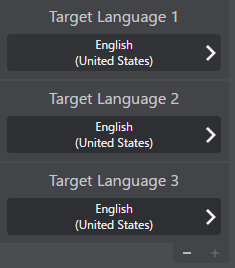
- Repeat to add up to 3 target languages total
Removing Target Languages
- Click the [-] button next to the target language you want to remove

- The language will be removed immediately
Message Display
When multiple target languages are set:
- Your original message is shown first
- Translations appear in the order of the target languages you set
Example:
Japanese to (English, Korean, Spanish) set as target languages
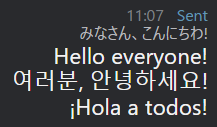
The order of translations matches the order of your target language settings from top to bottom.
Use Cases
Multilingual VRChat Worlds
When visiting international worlds with players from different countries:
- Set all common languages used in that world
- Everyone can see translations in their preferred language
Event Hosting
When hosting events with international attendees:
- Add all major languages of your expected audience
- Ensure important announcements reach everyone
Language Learning
When practicing multiple languages:
- See how your message translates to different languages
- Compare translations across different target languages
Performance Considerations
Translation Speed
- More target languages = more API calls or processing
- Cloud-based engines: Multiple API requests
- AI engines: Sequential processing
Using 3 target languages will take approximately 3x longer than using 1 target language.
API Limits
If using cloud-based translation engines:
- Each target language counts as a separate API call
- Monitor your API usage if you have quota limits
- Consider mixing free AI engines with paid APIs
Best Practices
- Start with Essential Languages: Add only languages you actually need
- Monitor Performance: If translations are too slow, reduce target languages
- Choose Appropriate Engines: Use the best engine for each language pair
- Update as Needed: Add/remove languages based on who's in the world
Limitations
- Maximum 3 target languages can be set at once
- Each language must be different from your source language
Troubleshooting
Translations Taking Too Long
- Reduce the number of target languages
- Switch to faster translation engines (Google, Bing)
- Check network connection (for cloud engines)
Target Language Not Appearing
- Verify the translation engine supports that language pair
Messages Too Long for VRChat Chatbox
- VRChat chatbox has a character limit (144 characters)
- Multiple translations may exceed this limit
- If the character limit is exceeded, messages may not display correctly. Please reduce the number of target languages or shorten the message if necessary.
Related Features
- Translation Engines - Learn about available engines
- Real-time Translation - Basic translation feature
- Language Presets - Save common language combinations