Language Presets
Language Presets allow you to save and quickly switch between frequently used language combinations. You can configure up to 3 presets for instant access.
Overview
Instead of manually selecting languages every time, you can:
- Save your most-used language combinations as presets
- Switch between presets with a single click
- Configure different translation engines for each preset
This is especially useful when you regularly communicate in different language groups.
How to Use
Preset Tabs
In the main window, you'll see three preset tabs:
- Preset 1
- Preset 2
- Preset 3
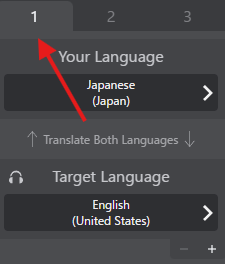
Switching Presets
- Click on any preset tab (1, 2, or 3)
- VRCT immediately switches to that preset's language configuration
- All language settings and translation engines update automatically
Tip
The currently active preset is highlighted.
Configuring Presets
Configure While Active
- Switch to the preset you want to configure
- Set your desired languages:
- Your Language
- Target Language(s)
- Translation Engines
- The preset automatically saves your configuration
Preset Configuration
Each preset can store:
- Your Language: The language you speak/type
- Target Language(s): Up to 3 target languages
- Translation Engines: Different engine for each target language
- Additional Settings: Preset-specific translation preferences
Use Cases
Example 1: International Communities
If you frequently visit different VRChat communities:
- Preset 1: English → Japanese (for JP communities)
- Preset 2: English → Korean (for KR communities)
- Preset 3: English → Spanish (for ES communities)
Example 2: Multilingual Friend Groups
- Preset 1: English → Japanese + Korean (Asian friends)
- Preset 2: English → Spanish + French (European friends)
- Preset 3: Japanese → English (reverse translation)
Best Practices
Organize by Context
- Community-Based: One preset per VRChat community you visit
- Language-Based: One preset per primary language pair
- Purpose-Based: Casual chat, serious discussion
Test Your Presets
After configuring:
- Switch between presets
- Test each one with sample messages
- Ensure languages and engines are correct
Troubleshooting
Languages Not Switching
- Verify you clicked the preset tab
- Check the language indicators updated
- Restart VRCT if presets seem stuck
Translation Engine Not Changing
- Some engines require API keys to be configured first
- Check the engine is available for your language pair
- Verify internet connection (for cloud engines)
Related Features
- Real-time Translation - Learn about translation basics
- Multiple Target Languages - Use multiple languages
- Translation Engines - Configure engines
- Hotkeys - Set up keyboard shortcuts for presets