Translation Engines
VRCT supports multiple translation engines, each with its own strengths and characteristics. You can select the best engine for your needs.
Overview
Different translation engines offer various advantages in terms of speed, quality, language support, and privacy. VRCT allows you to choose from a range of engines, including local AI models and cloud-based services.
How to Select Translation Engine
- In the main window, click on the translation engine name area
- A selection menu will appear showing available engines
- Select the engine you want to use
- The selected engine will be applied immediately
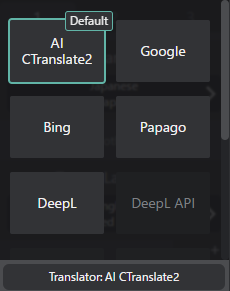
Available Engines
AI Translation (Default)
This engine uses a locally running AI translation model based on the CTranslate2 library.
Model:
- m2m100(Facebook's Multilingual Machine Translation model supporting 100 languages.)
- nllb-200(Meta's Multilingual Machine Translation model supporting 200 languages.)
To use this engine, you need to have the AI Translation model downloaded and configured.
Please refer to the ctranslate2-model-and-settings page for more details.
Advantages:
- Works offline (no internet required)
- No API key needed
- Free to use
- Good privacy (no data sent to external servers)
- Supports 100+ languages
Disadvantages:
- Requires more system resources
- May be slower than cloud-based services
- Translation quality may vary by language pair
Best For:
- Users who want offline capability
- Privacy-conscious users
- General casual conversations
Reference:
You can select different AI models in the Translation Settings.
Google Translate
Advantages:
- Fast and reliable
- Excellent support for many language pairs
- Free tier available
- Good context understanding
Disadvantages:
- Requires internet connection
- limited free usage (API quota)
- Privacy concerns (data sent to Google servers)
Best For:
- General-purpose translation
- Quick translations
- Wide language support
DeepL/DeepL API
Advantages:
- High translation quality
- Natural-sounding translations
- Excellent for European languages
- Good context awareness
Disadvantages:
- Requires internet connection
- API key required or limited free usage (API quota)
- Limited language support compared to others
Best For:
- Professional or important messages
- European language pairs
- Quality over speed
Bing Translate (Microsoft)
Advantages:
- Fast translation speed
- Good language support
- Reliable service
Disadvantages:
- Requires internet connection
- limited free usage (API quota)
Best For:
- Balanced speed and quality
- Reliable everyday use
Papago (Naver)
Advantages:
- Excellent for Korean, Japanese, Chinese
- Good understanding of Asian languages
- Natural translations for East Asian languages
Disadvantages:
- Requires internet connection
- limited free usage (API quota)
- Limited to certain language pairs
- Focus on Asian languages
Best For:
- Communication with Korean, Japanese, Chinese speakers
- East Asian language pairs
OpenAI API
Advantages:
- Uses Large Language Models (LLMs) for context-aware translations
- Can handle complex sentences well
- Continuously improving with AI advancements
Disadvantages:
- Requires internet connection
- API key required
- Potentially higher costs depending on usage
Best For:
- Users needing context-aware translations
- Complex or nuanced messages
Gemini API
Advantages:
- Use Google's latest Gemini LLMs for translation
- Good context understanding
- Continuously improving with AI advancements
Disadvantages:
- Requires internet connection
- API key required
- Potentially higher costs depending on usage
Best For:
- Users needing context-aware translations
- Complex or nuanced messages
Plamo API
Advantages:
- Uses Rinna's Plamo LLMs for Japanese-centric translation
- Good for Japanese to other languages and vice versa
- Continuously improving with AI advancements
Disadvantages:
- Requires internet connection
- API key required
- Limited to Japanese-centric translations
Best For:
- Users frequently translating between Japanese and other languages
Groq API
Advantages:
- Extremely fast inference speed
- Handles complex text efficiently
- Continuously improving with AI advancements
- Good cost-efficiency with competitive pricing
Disadvantages:
- Requires internet connection
- API key required
- Relatively new service
Best For:
- Users who need fast translations
- Cost-conscious users
- Real-time translation scenarios
Open Router API
Advantages:
- Access to multiple LLM providers through a single API
- Flexible model selection
- Unified API interface
- Cost optimization options
Disadvantages:
- Requires internet connection
- API key required
- Depends on provider availability
Best For:
- Users wanting to try multiple LLM models
- Users seeking optimal cost/performance balance
- Comparing different LLM providers
LM Studio API
Advantages:
- Local AI translation using LM Studio server
- No data sent to external servers
- Good privacy
Disadvantages:
- Requires LM Studio server setup
- May require more system resources
- Limited by available LM Studio models
Best For:
- Privacy-conscious users
- Users with LM Studio setup
Ollama API
Advantages:
- Local AI translation using Ollama server
- No data sent to external servers
- Good privacy
Disadvantages:
- Requires Ollama server setup
- May require more system resources
- Limited by available Ollama models
Best For:
- Privacy-conscious users
- Users with Ollama setup
Other Engines
VRCT continuously adds support for more translation engines. Check the Config Window for the latest available options.
Choosing the Right Engine
For Best Quality
- DeepL: European languages
- Papago: Korean, Japanese, Chinese
- Google Translate: Most other languages
- OpenAI/Gemini: Context-aware translations
- Plamo: Japanese-centric translations
- Groq: Fast and high-quality translations
- Open Router: Flexible translations with multiple models
For Privacy
- AI Translation: Works completely offline
- LM Studio: Local server-based translation
- Ollama: Local server-based translation
For Speed
- Groq: Fastest inference speed
- Google Translate: Generally fastest
- Bing Translate: Consistent speed
- OpenAI/Gemini: Fast with good context handling
For Free Use
- AI Translation: No API key needed
- Google Translate: limited free usage
- Papago: limited free usage
- Bing Translate: limited free usage
- Groq: limited free usage and low cost options
- Open Router: Multiple providers with free options available
Configuration
API Keys
Some translation engines require API keys:
- Open the Config Window
- Navigate to the Translation Tab
- Enter your API key for the desired engine
- Save settings
For detailed configuration, see the Translation Config Guide.
Engine Priority
When using multiple target languages, you can set different engines for each target language based on:
- Language pair compatibility
Performance Considerations
Cloud-based Engines
- Require stable internet connection
- Translation speed depends on network latency
- May have usage limits or costs
Local AI Engines
- Require more RAM and CPU/GPU resources
- No network latency
- Unlimited usage
- First-time use may require model download
Troubleshooting
Engine Not Available
- Check internet connection (for cloud-based engines)
- Verify API key is correctly configured
- Ensure the engine supports your language pair
Slow Translation
- For cloud engines: Check network connection
- For AI engines: Check system resources (CPU/GPU/RAM usage)
Translation Errors
- Verify API key validity
- Check API quota/limits
- Try switching to a different engine
Related Features
- Real-time Translation - Learn about the translation feature
- Multiple Target Languages - Use multiple engines simultaneously
- Translation Settings - Configure translation engines