Chat Transcribe Tab
Configure how VRCT reads VRChat chat bubbles in the Chat Transcribe Tab of the Config Window.
For how the feature works and how to turn it on, see the Chat Transcribe guide.
Chat output
Text read by Chat Transcribe is shown in the message log and the SteamVR overlay. It is never sent to the VRChat chatbox.
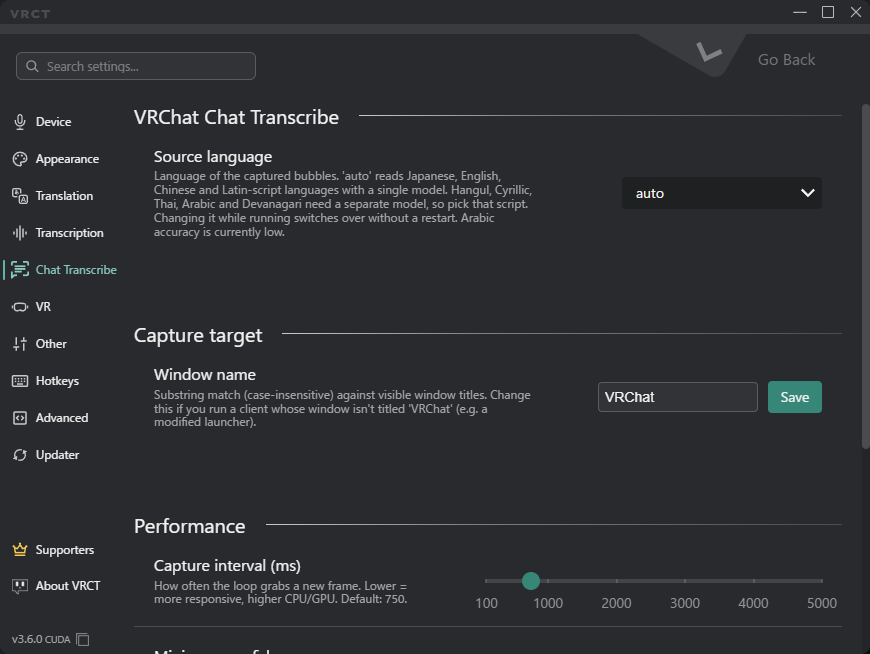
Capture Target
- Window name: The text used to find the VRChat window (case-insensitive, partial match). The default is
VRChat.- Change it only if your VRChat client's window title is different.
Language
- Source language: The language of the chat bubbles you want to read.
- Auto (default): Reads Japanese, English, Chinese, and other Latin-script languages with one model.
- Korean, Russian, Ukrainian, Thai, Arabic, Hindi: Each uses a separate model, so select the one that matches the chat.
- Arabic accuracy is currently low.
- You can change this value while Chat Transcribe is running. The change applies without a restart.
Performance
- Capture interval (ms): How often VRCT captures a new frame, from 100 ms to 5000 ms. The default is 750 ms.
- Lower values respond faster but use more CPU or GPU.
- Higher values reduce load.
- Minimum confidence: Text whose OCR confidence is below this value is discarded. The range is 0.10 to 0.99, and the default is 0.85.
- Raise it to reduce false positives.
- Lower it to catch faint bubbles.
- Minimum text length: Bubbles with fewer characters than this value are ignored. The range is 1 to 50, and the default is 2.