OverRec
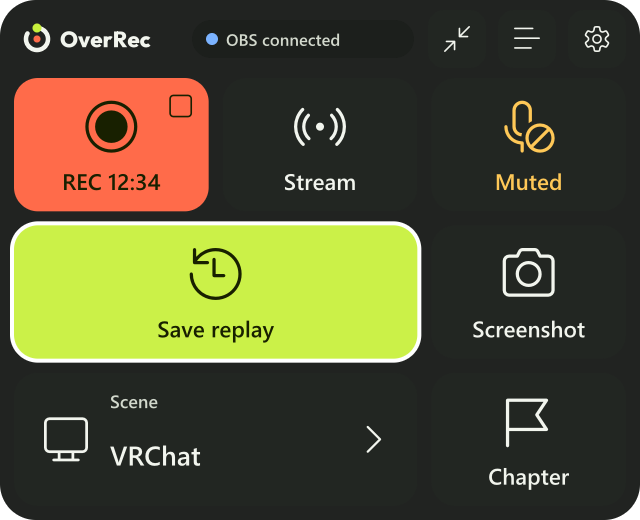
A wrist panel that controls OBS Studio from inside VR. Without taking your headset off, you can start and stop recording and streaming, save the last few tens of seconds (a replay), and take screenshots.
These docs are for OverRec v1.0.0. Your version is shown at the bottom left of the PC settings window.
Find by goal
First timeFrom installing to showing the panel in VRLearn the buttonsRecord, stream, save replay, screenshot, scene, chapter, micSee what OBS showsThe preview: what is on air, beside the panelCustomizePosition and size, the small sign, which hand, controller bindingsLook up a settingThe PC settings window and the panel's gearSomething's wrongCommon problems, and how to report a bug
What it does
| Save replay | Press the button to save the last few tens of seconds as a video |
| Record and stream | Start and stop. The elapsed time is shown on the panel |
| Screenshot | Saves what OBS shows as a PNG |
| Scene | Choose from the list to switch |
| Chapter | Marks a moment while recording, so it is easy to find later |
| Mic | Mutes and unmutes. Its state is always shown |
| Preview | See what OBS shows, beside the panel |
| Controller bindings | Use controller buttons without opening the panel |
OBS Studio does the recording and encoding. OverRec is a remote that works OBS from inside VR. It is not only for VRChat: it works with any game you play through SteamVR.
The settings window and the panel can be shown in English, 日本語, 한국어, 简体中文 and 繁體中文.
Requirements
- A PC with Windows 11 (or 10)
- SteamVR and a VR headset that works with SteamVR
- OBS Studio 28 or later (running on the same PC as OverRec)
With a Quest and the like, connect to SteamVR through Steam Link, Virtual Desktop (SteamVR mode) or Quest Link. It does not work when you play without SteamVR (VDXR or Meta's OpenXR runtime).