Your first message
Type "hello" and send it to VRChat's chatbox. Keep VRChat's text field closed.
1. Choose English
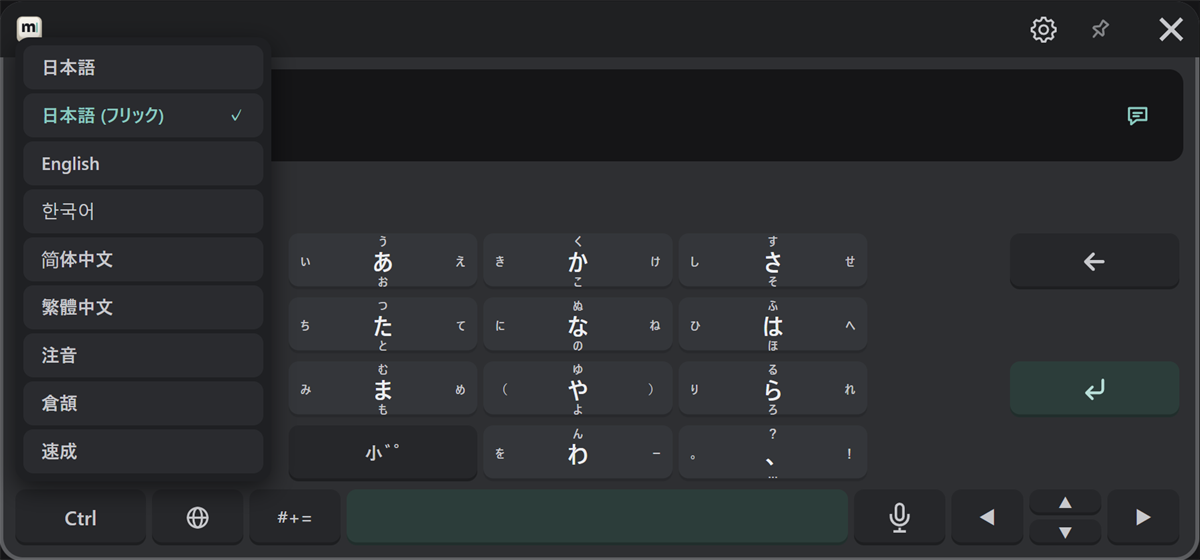
Press the 🌐 key and choose "English". The list shows each language in its own script.
2. Type
Type hello. Word suggestions appear in the candidate row; press one to use it, or press Tab to take the highlighted one.
3. Check the send target
Check that the right end of the text field (②) shows the speech bubble. If it shows the other icon, press it to switch.
4. Send
Press ↵. The message appears in VRChat's chatbox, and the text field becomes empty.
If it isn't sent
- Check that OSC is on in VRChat (see Installing and starting).
- Check that the wrist button doesn't show "OSC Error".
- Otherwise, see the FAQ.